The Five Dimensions That Matter When Choosing an AI Music Platform
Choosing an AI Music Generator in 2026 is not straightforward. Every platform promises something similar. Turn text into music. Generate songs in seconds. Create royalty-free tracks for any project. The marketing language converges, and it becomes difficult to distinguish real differences from clever copy. After spending several weeks testing seven platforms side by side, I learned that the differences are real but not always where reviews point. The deciding factors are not usually about which tool can produce the most surprising demo. They are about which tool makes the experience of creating music feel like a sustainable, repeatable process rather than a one-time experiment.
This article approaches the decision the way I would advise a friend who needs to pick one platform and use it regularly. I evaluated each tool across five dimensions: sound quality, loading speed, ad distraction, update activity, and interface cleanliness. I also considered how each platform handles different creative starting points, such as lyrics, mood descriptions, and instrumental needs. The goal was not to crown a winner but to understand trade-offs. What you gain in one dimension often costs you something in another. The question is which trade-offs you can live with over time.
A Framework for Comparison
Before diving into specific tools, it helps to explain why I chose these five dimensions. Sound quality is the most discussed metric, but it is not always the most important. A platform can produce beautiful audio and still be difficult to use regularly. Loading speed shapes creative momentum. Ad distraction erodes focus. Update activity signals whether the tool will keep improving or stagnate. Interface cleanliness determines whether you can navigate the tool intuitively or feel like you are decoding a puzzle every time.
How the Platforms Were Tested
I tested ToMusic AI, Suno, Udio, Soundraw, Mubert, Beatoven, and AIVA as part of a broader AI Music Maker comparison. Each platform received at least three separate testing sessions. I used a consistent set of prompts and creative tasks across all platforms, including a lyric-to-song task, an instrumental background music task, and a mood-based short-form content task. I recorded timing, observed interface behavior, noted advertising interruptions, and assessed overall usability. The scores reflect cumulative experience rather than any single session.
The Five-Dimension Scorecard
The table below shows how each platform performed across the five evaluation criteria. Scores are out of ten and reflect my experience across multiple sessions.
| Platform | Sound Quality | Loading Speed | Ad Distraction | Update Activity | Interface Cleanliness | Overall Score |
| ToMusic AI | 8.9 | 9.1 | 9.2 | 9.0 | 9.2 | 9.1 |
| Suno | 9.2 | 8.4 | 8.4 | 9.3 | 8.0 | 8.7 |
| Udio | 8.8 | 8.0 | 8.2 | 8.9 | 7.8 | 8.3 |
| Soundraw | 8.3 | 8.4 | 8.5 | 8.1 | 8.3 | 8.3 |
| Mubert | 7.9 | 8.5 | 8.3 | 8.0 | 8.2 | 8.2 |
| Beatoven | 7.7 | 7.9 | 8.1 | 7.8 | 7.9 | 7.9 |
| AIVA | 7.6 | 7.6 | 8.0 | 7.7 | 7.7 | 7.7 |
Suno leads on sound quality, which aligns with its reputation in the AI music community. Its vocal realism and arrangement coherence remain strong, particularly for mainstream pop and structured song formats. Udio also produces compelling audio, with vocal performances that some users find more expressive than Suno’s in certain genres. ToMusic AI did not claim the highest audio score. Its advantage appears in the balance across dimensions. When sound quality is good enough to be useful and every other factor is strong, the overall experience becomes more reliable than a platform with brilliant audio but a frustrating interface.
Why Sound Quality Alone Is Not Enough
During testing, I had sessions where a platform produced a track so good I wanted to save it immediately. But when I looked for the download button, it was hidden behind a settings menu. When I tried to generate a variation, the prompt field had cleared. When I checked my library, the track was not labeled in a way I could find again. The audio was excellent, but the experience around it was broken.
The Hidden Cost of Poor Interface Design
This pattern repeated across multiple platforms. The audio output was impressive, but the surrounding experience discouraged continued use. Interface cleanliness is not a cosmetic concern. It directly affects how many tracks you generate, how easily you iterate, and whether you feel in control of the output. A cluttered interface creates a subtle but persistent sense that you are fighting the tool. Over time, that feeling matters more than how good any single track sounds.
The Platforms with Clearer Priorities
Soundraw and Mubert both performed adequately in this comparison. Their interfaces are functional, and their audio quality is serviceable for background music and content creation needs. However, both platforms are built around narrower use cases than ToMusic AI. Soundraw excels at instrumental background music generation with a straightforward customization workflow. Mubert is built for continuous audio streams and background use, with a strong API integration story for developers. These are valid products with specific audiences. They are not direct competitors to broader platforms that support full songs, lyrics, and multiple model choices.
The Role of Creative Starting Points
One factor that separated ToMusic AI from several competitors was how the platform handled different creative entry points. Some people come to AI music with a full set of lyrics and a clear genre in mind. Others come with only a mood and a use case, not knowing what genre or tempo would work best. Some need instrumental music. Others need vocals. A platform designed around a single workflow will frustrate everyone who thinks differently.
Lyrics as a First-Class Input Path
ToMusic AI treats lyrics as a primary creative input rather than an optional extra. The custom mode allows users to enter their own lyrics, define structural markers, and receive a complete song in return. During testing, I found that the platform’s interpretation of lyrical material was generally coherent, though results varied by genre and prompt specificity. Some generation attempts required multiple iterations to arrive at a satisfying result. That is normal for this category and should not be mistaken for a limitation specific to any one platform.
Instrumental Flexibility Across Use Cases
The instrumental mode is similarly well-integrated. You can specify that you want a track without vocals and the platform respects that choice without complicating the workflow. This matters for the wide range of creators mentioned on the official site, including those working in video, content creation, advertising, gaming, education, and personal projects. Not every project needs a song. Having an AI Music Maker that handles both vocal and instrumental generation within the same interface reduces the need to switch between multiple specialized tools.
Generating Music with ToMusic AI
The following steps describe the generation process as I experienced it across multiple sessions. The workflow is straightforward enough that most users can produce their first track within minutes of arriving.
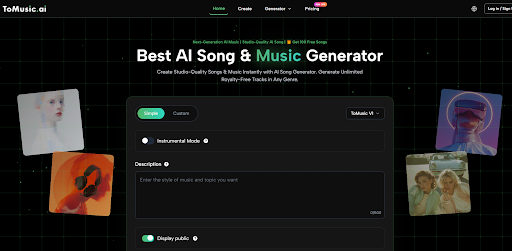
Start with mode selection. The simple mode accepts a plain-language description and handles the rest automatically. The custom mode provides more control, allowing you to enter lyrics and specify stylistic parameters.
Enter your creative description. In simple mode, describe the music you want using natural language covering mood, genre, tempo, and intended use. In custom mode, you can provide structured lyrics along with detailed style preferences.
If needed, choose from the available AI music models. This step allows you to steer the output toward different musical characteristics based on your project requirements.
Generate the track, listen critically, and decide whether to refine the input or save the result. Tracks can be stored in the Music Library for later access, management, and download.
Where the Category Still Has Room to Grow
AI music generation has advanced significantly, but it has not reached a point where every output is usable without human judgment. The technology interprets human language, but it does not yet understand creative intent the way a human collaborator would. This limitation applies to every platform in this comparison.
Output Variability Across Genres
Some genres are modeled more effectively than others. Mainstream pop, electronic, ambient, and acoustic styles tend to produce more reliable results. Highly experimental genres, complex rhythmic structures, or unusual instrumental combinations may require more attempts and more careful prompt crafting. This is not necessarily a criticism of any specific tool. It reflects the training data and model architecture that underpin the entire category.
The Prompt Quality Dependency
Every platform in this comparison depends heavily on the quality of user input. A well-written prompt that is specific about mood, tempo, instrumentation, and structure produces better output than a vague one. No platform can overcome a poorly written description. If you are new to AI music generation, expect a learning curve around prompt writing. The skill is learnable, but it requires practice and willingness to iterate.
This comparison taught me that the best AI music tool is rarely the one with the most dramatic single dimension. It is the one that balances multiple practical qualities well. ToMusic AI earned its position by performing strongly across sound quality, speed, freedom from distraction, update consistency, and interface clarity. It does not dominate any one category, but it does not fail in any either. That kind of balance matters more in daily use than a platform that excels in one area but falls short in others. For creators who need a reliable music generation workspace that supports multiple creative starting points and handles iterative refinement gracefully, the evidence points toward ToMusic AI as the most sensible choice among the tools I tested.