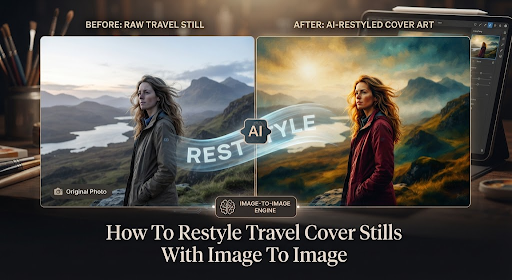
How To Restyle Travel Cover Stills With Image To Image
Travel magazines still ship a cover from a still they already have, because a second flight to Doha rarely fits the close. Desks that want warmer dusk on a Dubai feature often run an Image to Image pass on the photo that already shows the city line, hoping the sky lifts while the destination stays. The still is the source. Readers will say the city out loud if the masthead now points at another Gulf stop.
The old fix was a crop and a color grade in the layout file. That ate an afternoon and still left the same dusty sky if the photographer had already gone home. The newer habit is a short product sentence: warmer light, cleaner sky, same promenade. The render often looks finished on a laptop until it sits beside the printed masthead. Then Dubai becomes a generic “Gulf city,” or the skyline grows a tower that was never in the shot. The file goes back because the issue already named the city, and a prettier dusk cannot rewrite that line.
Why Travel Covers Need A New Still
A cover restyle is worth doing when the photo is already true and only the light is tired. The destination line is already a fact. The promenade is already in the frame. What the desk usually wants is a new image of that same place, not a fantasy city that would need a new caption.
That is the job the workbench is built for. You keep the still you shot. You ask for one change. You get another version of the same street. If the change also invents a new skyline, the cover is a different story. Different stories do not belong on an issue that already sold Doha.
The useful test is short. Read the city on the masthead. Read the city in the render. If they drift, the file never enters the cover folder. Taste is not the test. The destination line is the test.
What The Workbench Asks Before Generate
The visible path is short enough to say in one breath. Upload the source. Describe the change. Pick a model. Generate. Without the feature still that already holds the city, the sentence has nothing honest to keep. The source must be the photo that already shows the promenade, not a cropped wedge that cut the skyline “for a cleaner square.”
On a travel desk the first check happens before anyone types. The city name sits in the frame, or the skyline is clear enough that a reader can name the place. The sky can stay slightly dirty if the destination is sharp, because a magazine will forgive dust before it forgives a new city. Cropping the skyline to lose weight is the old error. The model cannot keep a place that left the crop.
Upload The Feature Still You Already Shot
A face-only crop of a traveler is not enough, because the object of the restyle is the place, not the jacket. If the minaret or the marina left the frame, the model often invents a longer skyline because a longer mark “closes” a square. That miss is an archive fail, not a taste debate. Export the still that still shows the real city, then open the workspace.
When the file already holds Dubai and a dusty afternoon, ask only for cleaner air. If the same sentence also asks for “a cinematic Gulf night,” the extra wish usually writes a new tower. An afternoon of retrace does not return the first reader who already booked the wrong stop.
Write One Change Not A New City
After the upload, write what stays and what moves in ordinary words. The promenade stays. The destination stays. The dusty sky leaves. One named change is enough for a cover. A paragraph that also asks for richer paint, a new boat, and a magazine night is a second brief, and the second brief is usually where the city drifts.
Keep the sentence short enough to read aloud without a breath. If you need a comma list of wishes, you are already writing a new location. Stop. Name the light. Leave the place alone.
Pick Flux Kontext For One Local Fix
This is where ToImage AI earns a place on a travel desk. Not as a new assignment that replaces the photographer. As a table where the phrase can name a local object and leave the rest of the street alone. Text-to-image does not belong here. The cover already exists in the issue plan. The newsstand needs the same street with one tired sky gone, not a dream Gulf from a prompt essay.
Flux Kontext Pro and Max are the pick when the job is a local object or a local patch of sky and the surroundings have to stay. The railing, the water, the type on a shop sign at the edge — those are surroundings. A catalog prompt treats them as dirt. Flux Kontext is useful when the sentence says the city stays and only the haze leaves.
Keep The Destination Line In The Frame
Local text is the destination line if the cover already printed a city word on a kiosk or a ferry board. Those marks are facts the issue already sold. Flux Kontext is the model that can lift haze beside them without rewriting the board. If the print is already soft in the source, do not ask the model to invent a sharper mark. Change the capture. Take a tighter crop that still shows the real word. Invented sharpness on a city board is how readers catch a drifted cover.
The middle of the job is not a model wall. The middle is one named local change. An Image to Image AI pass holds when the destination is named as stay. If the haze is gone and a new tower appeared, do not correct both in one rewrite. Return to the source. Keep only the sky cleanup. Stacking corrections inside one long paragraph recreates the invented city.
Common Restyle Errors On Cover Type
The usual miss is a hero sentence. “Cleaner sky, richer dusk, a current Gulf night.” Current is how a second skyline arrives on a still that was Dubai. Another miss is a full itinerary dump in the prompt: every hotel, every museum, every desert camp. The model then “completes” a missing landmark. Completing a landmark is inventing a trip.
A third miss is treating the destination board as noise because the letters sit in shadow under an awning. Shadow is not noise. Shadow is where the city word lives on a real street. Asking the model to “lift the shadow and clarify the place” often writes a longer, prettier name. The longer name is another asset. Another asset on a cover is a different city for the same week.
ToImage AI will still generate if the phrase is a long travel novel. The long novel is the risk because it invites a second skyline. The short local line is the method. Upload. Name the stay list. Name one change. Pick Flux Kontext. Then generate.
Check The Render Against The Printed Masthead
Before anyone drops the PNG into the cover folder, put the render on the same desk as the printed masthead. Read the city left to right. Read the skyline if that is how the issue sold the stop. If either moved, reject the cinematic night. Do not file it as a backup. Backups of wrong cities get reused in the next travel package. Reuse is how drifted covers travel through a year.
- Read the destination in the same order as the masthead.
- Say the city out loud before the second click.
- Keep the promenade if it already matches the feature.
- Name one cleanup, then stop typing.
That list fits on a card next to the layout machine. If the phrase overflows the card, do not click. ToImage AI can lift haze when the stay list is honest. It cannot argue with the printed issue. The issue is already at the printer. The cinematic night is the file that failed that check.
When The Cover Desk Should Stop Clicking
Recapture the street when the city is already gone from the source. Step closer. Then upload the still that already holds the place. A second essay on a blind crop is how a generic Gulf arrives. The hour spent on adjectives does not return the first reader who already packed the wrong bag.
This path fits a desk that already has the feature still and needs one tired sky gone. A catalog-essay brief can keep the hero paragraph. A travel cover cannot. A clean wedge that fails the destination is worse than a slightly dirty wedge that matches the masthead. The desk still reads the city after the haze is gone. ToImage AI stays in the workflow only while that city still matches.