How To Guest Post With A Written Brief First
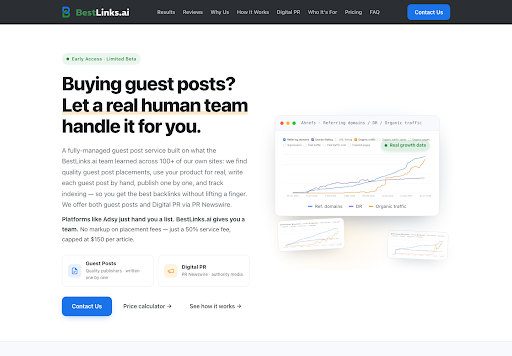
Lifestyle desks that cover hardware, travel kits, and rewards programs already know how to file a short assignment. What often arrives instead is a login, a long publisher list, and the quiet assumption that the desk will filter, write, and chase. BestLinks AI asks for a different object first: a written brief with the domain you want cited and a few competitors, sent to a person, not pasted into a filter. The public page has no dashboard for that job. It has six numbered cards and, lower down, three cards that start with an email.
Homepage with navigation, the main headline, and the two service cards.
The useful test of that page is whether a brief can survive the pick step. Card 03 still says you choose the sites. Card 01 only asks for a domain and competitors. If the brief stops at “please find links,” it does not match the page, and the shortlist comes back as a decision the desk never staffed.
What A Written Brief Replaces On Day One
A hardware or travel assignment usually names the product, the reader, and the thing that must stay true. A guest-post brief on this page is narrower. It names the domain to promote and the competitors the desk already watches. BestLinks.ai says it will also look for competitors you missed, so the first note does not have to be a census. It does have to be specific enough that “missed” means something.
That is the time you get back. On a self-serve list, someone still sets filters, opens site after site, and writes or spins the piece. Here the first hour is an email, not a crawl. The cost of a vague note shows up later, when the shortlist includes titles the desk would have rejected if it had named the lane: a luggage brand does not want a pile of gadget blogs just because the traffic number is high.
How The Six Public Steps Actually Split
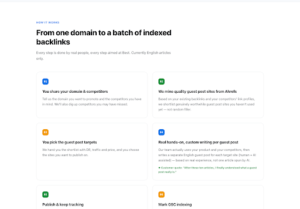
BestLinks.ai numbers six cards on the how-it-works block and says every step is done by people. The same block says articles are in English for now. A brief does not invent a seventh card. It packs those six into four things you can actually prepare, in the same order the cards use. The page is the source of the order. The four packets are only so a desk does not pretend it must write six memos.
| Packet you prepare | Cards on the page | What has to be true |
| Domain and competitors | 01 Share your domain and competitors | One domain to promote, plus names the desk already knows |
| A yes or no on targets | 02 Mine from Ahrefs, 03 You pick | The shortlist shows DR, traffic, and price, and you choose |
| Room for a separate article | 04 Hands-on writing per post | A person uses the product, then writes one English piece per site |
| A place to mark indexing | 05 Publish and track, 06 Mark GSC | Breaks get fixed; you mark what is indexed and what is not |
Read the middle column as the page, not as a wish. If a brief asks the team to publish on a site the desk has not chosen, it fights card 03. If it asks for one article pasted across the batch, it fights card 04.
Share The Domain And Name Real Competitors
Card 01 is short. Tell them the domain and the competitors you have in mind. They will dig for others. For a travel-gear desk, that means the brand you want cited and two or three sites a reader might compare it with, not a dump of every domain in the niche. Card 02 then mines guest-post sites from your existing backlinks and from those competitors’ link profiles, and it says the shortlist should be sites you have not used yet, not random filler.
Put that “not used yet” line in the brief as a check, not as a slogan. If the desk has already placed on a title, say so. Otherwise card 02 is guessing from Ahrefs, and the guess can still be a site you burned last season. The brief is where that memory lives. The mining card does not have your sent folder.
Pick From The Shortlist Before Writing Starts
Card 03 is the step people skip when they want a fully closed handoff. The page hands you the shortlist with DR, traffic, and price, and you choose the sites. Writing, on card 04, comes after that choice. A person on the team uses your product and your competitors, then writes a separate English article for each chosen site, with a human leading and AI assisting. It is not one article spun for the whole batch.
So the brief needs a picker. Name who on the desk can say yes, and what they are allowed to reject: a DR that looks fine beside a topic the magazine would not run, or a price that clears the number but sits on a site the editor has already marked off. The page does not pick for you. A brief that says “use your judgment on all of them” hands back a decision the card already assigned to the client.
Where The Email Start Replaces A Dashboard
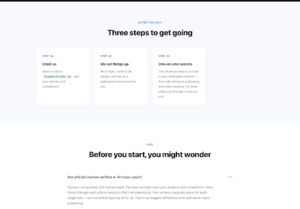
Lower on the same page, three cards sit under “After you buy.” They are not a second product tour. They are how the six cards actually start. There is still no filter panel. Guest Post work begins when the note arrives.
What Lands In The First Message
The first card on BestLinks.ai says to email buy@bestlinks.ai with the domain and competitors. The get-started answer on the page says a reply usually comes within 24 hours, the details get confirmed, and a dedicated channel is set up. The second card repeats that sequence in shorter form: reply, confirm, channel. The third card says the channel is where mining, publishing, and index tracking stay visible, one to one.
A brief that cannot fit in that note is too long for the door and too thin for card 03. Keep the first message to the domain, the competitor names, the lane (travel hardware, rewards, a single product), and who will pick when the shortlist returns. Save the DR argument for the shortlist, because that is when the page shows DR, traffic, and price together. Arguing those numbers before the list exists is how a desk burns a morning on columns it does not have yet.
Who Marks Indexing After The Link Is Live
Card 05 says each chosen site is published one by one, and that a broken link is fixed anytime. Card 06 says you mark which links are indexed in GSC and which are not. Both stay visible in the channel from the third get-started card. The brief should name the person who can open GSC. If that person is not in the first email, the tracking half of the page has nowhere to land, and “index tracking” becomes a promise with no one at the mark.
This is also where a wrong brief shows up late. A desk that wanted the vendor to certify indexing will not find that sentence on card 06. The card gives the mark to you. Write that into the assignment before anyone celebrates a live URL. A live page and an indexed URL are not the same box on this layout.
Mistakes That Send The Shortlist Back Late
Three misses cover most of the rework. The first is a domain with no competitors, so card 02 has less to mine and the “we will dig” line does all the work. The second is treating card 03 as a courtesy. If nobody is scheduled to choose, the writing card waits, and the 24-hour reply only bought a list that sits. The third is asking for a language the steps block does not offer. The how-it-works line says English articles only. A travel desk that needs the piece in another language should stop at the brief, not after card 04 has already used the product and drafted.
- Name one domain and a few real competitors, and flag sites you have already used.
- Name who picks when DR, traffic, and price show up together.
- Keep the first email short enough to confirm in one reply.
- Name who marks GSC after publish, and do not ask the team to invent that mark.
None of those four lines requires a tour of pricing or of someone else’s traffic charts. They are the fields the six cards already ask for. A brief that carries them can be checked against the page in one sitting. A brief that carries a mood and a budget cannot.
What To Send In The First Email
The desk that should send the note can name the domain, name a few competitors, and still show up to pick from the shortlist. BestLinks.ai fits that desk. It does not fit a desk that wants a dashboard, a closed handoff, or an article in a language the steps block does not offer.
Send buy@bestlinks.ai the domain, the competitors, the lane, and the name of the picker. Wait for the channel. Choose when the shortlist shows DR, traffic, and price. Mark indexing yourself after the link is live. That is the whole brief this page will accept.